 Update: If Motorola Assist does not read messages in home or driving mode (i.e.. it does not respond to your voice) after it asks you say Listen, please follow this guide to fix it.
 Update: If Motorola Assist does not read messages in home or driving mode (i.e.. it does not respond to your voice) after it asks you say Listen, please follow
 What is Motorola Assist on Moto G?
Motorola Assist on Moto G is one of the most useful apps you can find. It was provided by Motorola and, of course, it works on Motorola devices.
Motorola Assist on Moto G simply suggests actions to automate tasks, based on how you use your device. The app works like your personal assistant, and works quietly.
Driving Assist is not available in the Motorola Assist on Moto G
The Motorola Assist in Moto X and Droid (Droid MAXX, Droid Mini, and Droid Ultra) has three assists: driving, sleeping and meeting.
The Driving Assist lets you keep your eyes on the road and your hands on the wheel. Meeting and Sleeping will eliminate interruptions unless it’s an emergency.
But in Moto G, the Motorola Assist only comes with 2 assists: Sleeping and Meeting. The Driving assist is NOT available on Motorola Assist on Moto G.
The explanation from Motorola is due to hardware limitation in Moto G. So, do not waste time to find driving assist in your Moto G. Even if you manage to get the APK file, Driving Assist would not work.
Sleeping Assist on Moto G
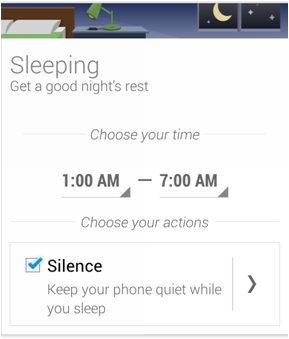 Once you let your Moto G knows your normal sleeping time, Motorola Assist on Moto G will automatically silence your phone. of course, if you want, certain callers can still get through if needed.
You need setup your normal sleeping time first in the Motorola Assist on Moto G. Then , you can enable “Silence” to turn on the sleeping assist..
If you want, by tapping the “>” button (in the right column of Silence, see attached image), you can create exceptions for favorite contacts, or someone who calling you twice within 5 mins.
If you change the phone volume when it is in sleep mode, the sleeping assist will stop working and un-silence the phone .
If you manually silence your phone when Moto G is in sleep mode, you must un-silence the phone the next day. In other words, Motorola Assist on Moto G will not un-silence your phone if the silencing is set by you manually.
Sleeping Assist only silences the notification and ringer. All other apps and … Read the rest
 What is Wireless Display?

