• Skip to primary navigation
  • Skip to main content
  • Skip to primary sidebar
  • Skip to footer

Moto G Phone Guide

  • Home
    • Contact
    • Privacy
    • Forum
  • User Manuals
    • Moto G8 User Manual for Moto G8 Plus and Moto G8 Play
    • Official Moto G7 user manual
    • Official Moto G6 user manuals, Moto G6 Play user manuals and Moto G6 Plus user manuals
    • Official Moto G5 User Manual and Moto G5 Plus User Manual
    • Moto G4 User Manual: official PDF user guide for Moto G4, Moto G4 Plus and Moto G4 Play
    • Moto G 2015 user guide
    • Moto G 2nd Gen User Manual (Moto G 2014 User Manual)
    • Moto G Manual (Mot G user guide)
  • how-to guide
    • Stylus features on Moto G Stylus (all models)
    • Understand Moto G Model Names
      • What’s new in Moto G 2024? Moto G 5G 2024 vs Moto G Power 2024 vs Moto G Play 2024
      • Moto G8 vs Moto G8 Power vs Moto G8 Power Lite vs Moto G Power vs Moto G Stylus vs Moto G Pro vs Moto G fast: What are the differences?
      • Moto G8 Plus vs Moto G8 Play: Differences and common features
      • Moto G7 vs Moto G7 Play vs Moto G7 Plus vs Moto G7 Power: what are the differences?
      • What are the differences: Moto G6 vs Moto G6 Plus vs Moto G6 Play (Moto G 2018)?
      • Moto G5 vs Moto G5 plus: the major differences between Moto G5 and Moto G5 plus
      • What’s new in Moto G5 and Moto G5 Plus?
      • What are the differences of Moto G4, Moto G4 Plus and Moto G4 Play?
      • Top 6 exciting improvements in Moto G 2015 (Moto G 3rd Gen)
      • Moto G 2014 (aka Moto G 2nd generation) vs Moto G: top 10 facts you should know
    • Moto G5 Plus SIM card guide
      • How to install Moto G5 SIM card?
    • How to take screenshot on Moto G (without using apps)
    • How to use Moto G camera and change camera settings?
    • How to access developer options menu in Moto G?
    • How to use FM radio on Moto G?
    • Moto G wireless display: the problem and the solution
    • Meaning of Moto G notification icons
    • How to use Moto G voice command?
    • How to use Motorola Assist on Moto G?
    • How to Silence Moto G Notifications and Ringtones
    • How to use dual SIM cards on Moto G?
    • How to connect Moto G with PC through USB cable? (for Moto E and Moto X as well)
    • How to use Bluetooth to transfer files on Moto G, Moto E and Moto X?
    • How to use Wi-Fi Direct to transfer files on Moto G, Moto E and Moto X?
    • How to block certain callers on Moto G, Moto E and Moto X?
    • How to use Moto G safe mode (applies to Moto X and Moto E safe mode as well )?
    • Moto G USB OTG guide (also for Moto X)
  • Online Manual
    • Moto G layout
    • How to remove Moto G back cover?
    • Moto G Home screen
    • Insert SIM card into Moto G and Moto E
    • How to add apps to Moto G home screen (for Moto E and Moto X as well)
    • Add new home screen pages on Moto G, Moto E and Moto X
    • Use widgets on Moto G home screen (for Moto X and Moto E as well)
    • How to update Moto G, Moto E and Moto X?
    • Moto G 2015 camera guide
    • Top 10 new features in Android Nougat update for Moto G4 and Moto G4 Plus
    • What’s new in Moto G5 and Moto G5 Plus?
  • Accessory Guide
    • Moto G case guide

What’s new in Moto G 2024? Moto G 5G 2024 vs Moto G Power 2024 vs Moto G Play 2024

by simon Leave a Comment

What's new in Moto G 2024? Moto G 5G 2024 vs Moto G Power 2024 vs Moto G Play 2024

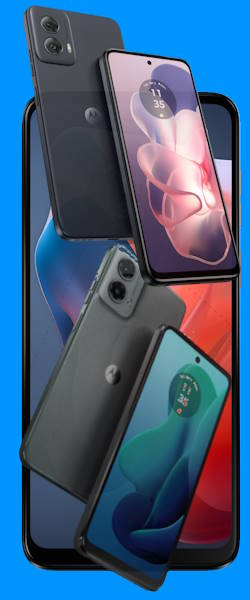
Moto G 2024  (Moto G Play 2024, Moto G 5G 2024, and Moto G Power 2024) has been announced and is available in some regions. Moto G Stylus 2024 will very likely be announced this summer.

Contents hide
1) The commonalities of Moto G 2024 models
1.1) 5000mAh Battery on all Moto G 2024 models
1.2) Headphone jack
1.3) SD card support
1.4) FM radio
1.5) No charger in the box
1.6) USB C 2.0 (no display output)
1.7) Water-repellent design
1.8) Fingerprint reader on all Moto G 2024 models
2) The differences in Moto G 2024 models
2.1) Andorid 13 or Android 14
2.2) 5G Connectivity
2.3) CPU
2.4) RAM
2.5) Storage
2.6) Display
2.7) Front Camera
2.8) Rear camera
2.9) NFC
2.10) Fast charging
2.11) Wireless charging on Moto G Power 2024
2.12) Material for the back panel
2.13) eSIM support (no play)
3) Choose the right Moto G 2024 model
4) What are your thoughts on Moto G 2024 models?

This Moto G guide explains the new features, improvements, commonalities, and differences of these latest Moto G 2024 models. It also includes a concise guide on how to choose the right model.

As Motorola adopted a confusing naming convention for Moto G, these Moto G 2024 models are mainly for the North American market. For the international market, Motorola released the Moto G04 and Moto G24 in 2024 and the Moto G34, Moto G54, Moto G84, and Moto G14 in the second half of 2023.

The commonalities of Moto G 2024 models

5000mAh Battery on all Moto G 2024 models

All Moto G 2024 models come with a 5000mAh battery, which can usually last more than one day for most users.

Although the battery capacity is identical, the charging speed differs. Moto G Power 2024 supports up to 30W USB charging. While Moto G Play 2024 only supports fast charging up to 15W. Read on.

Headphone jack

As usual, all 2024 models of Moto G still have the 3.5mm headphone jack, which has become a luxury. So, you can use any headset conveniently. You can also enjoy High-Res music without relying on Bluetooth codecs with a phone costing less than $300 (or $200), and owners of $1000+ phones can only dream of it.

SD card support

Similar to previous generations oh Moto G, micro SD card support is still available for all 2024 models. You can use the micro SD card to expand the internal storage or use it as portable storage.

FM radio

All 2024 models of Moto G have the FM radio feature. You need to connect a wired headset to the headphone jack as the antenna.

No charger in the box

Motorola has stopped offering chargers with new Moto G phones in most regions. Of course, you can use any existing USB charges. The cable included is a USB C to USB C.

USB C 2.0 (no display output)

Like other middle-range smartphones, Moto G 2024 only supports USB 2.0 for data transfer. The good news is that it supports USB on-the-go (OTG) natively. It is easy to connect and use a thumb drive or even a USB Drive with these Moto G phones.

Of course, USB C Alt mode is not supported. This means you cannot connect the phone to a TV or monitor directly with a USB to HDMI dongle. If you want to cast the screen, you may consider a Chromecast or Android TV.

Water-repellent design

There is no IP rating for all Moto G phones. All Moto G 2024 phones still have only water-repellent design.

Fingerprint reader on all Moto G 2024 models

All Moto G 2024 phones have a side-mounted (on the power button) fingerprint reader to help you unlock the phone quickly. Such an old-school capacitive fingerprinter reader is actually superior to the fancy under-display fingerprint sensors (or ultrasonic fingerprint sensors) found on flagship phones. It’s faster and more convenient.

Like some Moto G owners, we still prefer the fingerprinter reader embedded in the Motorola logo on the back of the phone (e.g., on Moto G8).

Moto G Power 5G | 2024 | Unlocked | Made for US 8/128GB | 50MP Camera | Midnight Blue
Motorola Moto G Play LTE | Unlocked | Made for US 4/64GB | 50MP Camera | Sapphire Blue
Moto G Power 5G | 2024 | Unlocked | Made for US 8/128GB | 50MP Camera | Midnight Blue
Motorola Moto G Play LTE | Unlocked | Made for US 4/64GB | 50MP Camera | Sapphire Blue
$129.17
$109.99
Buy on Amazon
Buy on Amazon
Moto G Power 5G | 2024 | Unlocked | Made for US 8/128GB | 50MP Camera | Midnight Blue
$129.17
Buy on Amazon
Motorola Moto G Play LTE | Unlocked | Made for US 4/64GB | 50MP Camera | Sapphire Blue
$109.99
Buy on Amazon

The differences in Moto G 2024 models

Let’s go through the differences among Moto G 2024 models.

Andorid 13 or Android 14

Moto G Play 2024 was released earlier with Android 13. While Moto G 5G 2024 and Moto G Power 2024 were both released with Android 14. The coming models will very likely come with Android 14.

Please note that Motorola has been far behind Samsung and Google in updating their Android phones. Moto G normally only gets one major Android update.

5G Connectivity

Moto G Play 2024 only supports 4G LTE. The other two, Moto G 5G 2024 and Moto G Power 2024, support 5G. In some marketing materials, Moto G 5G 2024 is also mentioned as Moto G 2024 5G. In fact, these are the same model. The 4G-only model is Moto G Play 2024.

CPU

One of the biggest differences among the 2024 models of Moto G is the CPU (chipset).

Moto G Power 2024 has the most powerful CPU of Mediatek Dimensity 7020, which is a 6nm mid-range smartphone processor with two Cortex-A78 cores at 2.2 GHz and six Cortex-A55 cores at 2.0 GHz. It is comparable to the Snapdragon 695.

Moto G 5G 2024 comes with Snapdragon 4 Gen 1, which is a 6nm entry-level mid-range smartphone processor with two Cortex-A78 cores at 2.0 GHz and six Cortex-A55 cores at 1.8 GHz.

Moto G Play 2024 is equipped with Snapdragon 680 4G, which is also a 6nm entry-level mid-range smartphone processor with four Cortex-A73 cores at 2.4 GHz and four Cortex-A53 cores at 1.9 GHz. The performance is comparable to Snapdragon 4 Gen 1.

RAM

Both the Moto G Play 2024 and the Moto G 5G 2024 have only 4GB RAM. The phones may become slower after using some apps for a while.

Moto G Power 2024 gets 8GB RAM. It is sufficient for most apps, including most games.

Storage

All three Moto G models use UFS 2.2 storage, but the capacity differs. Moto G Play 2024 has only a 64GB storage option, while the other two offer 128GB storage.

Please note all Moto G 2024 models support a micro SD card. You can even use it to expand the internal storage.

Display

All Moto G models use an IPS LCD display. But the screen size is slightly different, ranging from 6.5″ (Moto G Play 2024) to 6.6″ (Moto G 5G 2024) and 6.7″ (Moto G Power 2024). The dimensions of these three models also differ.

The display resolution is different. Both Moto G Play 2024 and Moto G 5G 2024 have a 720p resolution, while Moto G Power 2024 boosts a 1080p resolution.

For the refresh rate, both Moto G 2024 and Moto G 5G Power 2024 can achieve 120Hz refresh rate. Moto G Play 2024 can only reach 90Hz. However, most users will not be able to tell the difference.

Front Camera

Both the front and rear cameras of 2024 Moto G phones can record video up to 1080p@30fps. But the camera sensors differ.

The Moto G Power 2024 has a 16MP wide-angle front camera with f/2.4, while the other two have an 8MP wide-angle front camera with f/2.0.

Rear camera

The rear cameras on these three phones differ more significantly.

Moto G Power 2024 comes with dual rear cameras: one 50MP wide-angle main camera with OIS (optical image stabilization) and one 8MP ultra wide-angle camera. The 50MP sensor combines 4 pixels into 1, resulting in an effective photo resolution of 12.5MP.

The Moto G 2024 also comes with dual rear cameras, but the specs are inferior. The 50MP main camera does not have OIS. The 2MP secondary camera is mainly used for macro photos. There is no ultra-wide-angle camera lens.

Moto G Play 2024 has a single 50MP rear camera without OIS.

NFC

Motorola finally brought back NFC to Moto G devices in the US market this year. It makes it easier to make mobile payments.

Both Moto G Power 2024 and Moto G 5G 2024 now support NFC. However, Moto G Play 2024 still lacks it.

Fast charging

All 2024 models of Moto G support fast charging. However, the maximum charging speed is different. Moto G Power 2024 supports up to 30W fast charging. But Moto G 5G 2024 and Moto G Play 2024 support up to 18W and 15W fast charging, respectively.

As mentioned earlier, Motorola does not include a charger in the box. You need to get your own charger.

Wireless charging on Moto G Power 2024

Wireless charging finally comes to Moto G. Moto G Power 2024 now supports fast wireless charging up to 15W. The other models do not support wireless charging.

Material for the back panel

All Moto G phones still use a plastic frame. This is not a bad thing because it helps reduce weight.

But the back panel now has two different materials: plastic for Moto G Play 2024 and eco-leather (silicon polymer) for Moto G 2024 and Moto G Power 2024.

eSIM support (no play)

Moto G Power 2024 and Moto G 2024 support eSIM. However, Moto G Play 2024 does not.

Choose the right Moto G 2024 model

When choosing the right phone, you always have to balance the budget and typical usage. Do not just look at the spec sheet.

Moto G Play 2024 is wallet-friendly and, therefore, ideal for budget-conscious users who prioritize basic daily tasks and don’t need 5G or fancy features. Motorola often offers a deep discount for this model when no new Moto E models are released.

Moto G 5G 2024 is perfect for users who want a balance between price, performance, 5G connectivity, and a decent battery life.

Moto G Power 2024 is the best option for users who demand the most performance, a beautiful display, all-day battery life, and potentially a more capable camera system.

What are your thoughts on Moto G 2024 models?

Please share your thoughts, questions, and comments on Moto G 2024 models (Moto G Play 2024, Moto G 2024, and Moto G Power 2024) in the comment box below.

For more Moto G online manual pages, please check this page.

For detailed step-by-step guides, please check the Moto G How-to guides page.

Share this:

  • Share on Facebook (Opens in new window) Facebook
  • Share on X (Opens in new window) X
  • Share on LinkedIn (Opens in new window) LinkedIn

Filed Under: Moto G Buyer Guide, Moto G News Tagged With: 5G, Android 13, Android 14, battery, camera, charger, eSIM, fast charging, fingerprint sensor, headphone jack, Moto G 2024, Moto G 5G, Moto G Play, Moto G Power, NFC, USB-C, wireless charging

Reader Interactions

Leave your commentsCancel reply

Primary Sidebar

Stop Telling Boring One-Liners. Start Telling Unforgettable Stories.

All Over The Map: Funny Stories for Every Place You Go—From 36,000 Feet to the Bedroom
$4.99
Buy on Amazon

Moto G Update Newsletter

RSS Galaxy S25 Guides

  • All New Features of One UI 8 (Android 16) Update for Galaxy S25, S24, S23, and S22
  • One UI 8 Update Highlights for Galaxy S25, S24, S23, and S22
  • How to manage camera modes on Galaxy S25 (and Galaxy S24, S23, S22, and S21 with One UI 7 update)?
  • How to Use Galaxy S25 Camera App?
  • A Definite Guide to Galaxy S25 Flipsuit Case
  • How to Access and Customize Now Brief on Galaxy S25?
  • Meaning of Galaxy S25 Status Icons and Notification Icons
  • Layout of Galaxy S25, S25+, and S25 Ultra
  • New Galaxy AI features in Galaxy S25, S25+, and S25 Ultra
  • Top 10 new features of Galaxy S25, S25+, and S25 Ultra

RSS Galaxy S24 Guides

  • The definitive guide to One UI 7 (Android 15) update for Galaxy S24, S23, S22, and S21
  • The Definitive Guide to Galaxy AI on Galaxy S24, S23, S22, Fold 6, Fold 5, Flip 6, and Flip 5
  • Use the Light Performance Profile to Extend Battery Life and Reduce Heat on Galaxy S24, S23, S22, and S21 (all Samsung Galaxy Phones with Android 14/One UI 6.0)
  • How to adjust lock screen timeout on Galaxy S24, S23, S22, and other Galaxy devices?
  • How to use Circle to Search on Galaxy S24?

RSS Galaxy S23 Guides

  • Explanation of all One UI 6.1 features for Galaxy S23, S23+, S23 Ultra, and other Galaxy devices
  • How to use One-Tap Editing in the Android 14 (One UI 6) update?
  • How to enable and use Auto Scan to scan documents automatically on Galaxy S23, S22, and S21?
  • New camera features in One UI 6 (Android 14) update for Galaxy S23, S22, and S21
  • Galaxy S23 User Manual in American English with Android 14 (One UI 6) Update

RSS Galaxy S22 Gudies

  • A Complete Guide for Android 14 (One UI 6) Update on Samsung Galaxy Devices
  • How to touch and hold to customize Lock Screen on Galaxy S22, S21, and S20 with the Android 13 update?
  • How to use Maintenance Mode on Galaxy S23, S22, S21, and S20 with Android 13 (One UI 5)?
  • How to extract text from photos and images on Galaxy S22, S21, and S20?

RSS Samsung Galaxy S21 Guides

  • Top 12 new features in Android 12 update for Galaxy S21, S20 and S10
  • Android 12 update vs One UI 4.0 vs One UI 4.1: update Galaxy S21, S20 and S10 to Android 12
  • How to set and resize photo size on Samsung Galaxy S21, S20, S10, and S9 without using any third-party apps?

RSS Headphone Guides

  • Understand The Physics of Open-Ear Directional Audio
  • Bone Conduction Headphones Buyer’s Guide: 2026 Edition
  • Bone Conduction Audio Technology: A Technical Breakdown
  • Science And Architecture of Bluetooth Auracast
  • Bluetooth LE Audio and the LC3 Codec: A Technical Deep Dive
  • The Physics and Engineering of Super Wide Band (SWB) Voice
  • True Wireless Stereo (TWS) Explained
  • The Complete Technical Guide to the Galaxy Buds 4 & Buds 4 Pro

RSS Galaxy Note Tips & Tricks

  • Top 11 disappointments of Galaxy Note 20 and Galaxy Note 20 Ultra
  • How to use the Dynamic Lock screen on Galaxy Note 10?
  • Galaxy Note 10 LED View Cover Guide and Review
  • Install S Note app and Extension pack on Galaxy Note 10

RSS Kindle Fire For Kids

  • Fire Tablet Buyer’s Guide 2025
  • How to use Writing Assist on Fire Tablet?
  • How to use Wallpaper Creator on your Fire tablet?
  • How to Use Webpage Summaries on Your Fire Tablet?
  • What’s new in Fire HD 8 2024 (12th Gen)?

RSS Chromecast Guide

  • How to enable developer options in Chromecast with Google TV and Google TV Streamer?
  • Meaning of LED light on voice remote for Chromecast with Google TV and Google TV Streamer
  • What’s new in Chromecast 2018 (3rd gen of Chromecast)?
  • How to use VLC media player on PC to stream music and video to Chromecast and Chromecast Audio?
  • How to use Chromecast Ultra to stream 4K content?
  • How to disable Google Home and Chromecast casting notification?

RSS Moto E Guide

  • Official user manual for Moto E6, Moto E6 Plus, Moto E6 Play, and Moto E6s
  • Moto E 2nd Gen (Moto E 4G): the best value-for-money smartphone in 2015
  • How to use alarm and customize alarm tones on Moto E, Moto G and Moto X?
  • How to create app folder on Moto E?

RSS Samsung Galaxy S20 Guides

  • The End of the Road: No Android 14 Update for the Galaxy S20
  • How to Use Enhanced Processing on Galaxy S20 with Android 11 update?
  • How to access, use, and customise widgets on Galaxy S20 lock screen and AOD screen with Android 11 update for Galaxy S20?
  • How to update Galaxy S20 to Android 11?

RSS Chinese Classical Music

  • How to Cast Chinese Music Radio to Chromecast or Google Home?
  • 十面埋伏 (Ambushed,Pipa,琵琶曲,Shi Mian Mai Fu)
  • Meet in Yurt(敖包相会, Ao Bao Xiang Hui,Folk song,民歌)
  • Purple Bamboo Melody(紫竹调, Zi Zhu Diao,Yangqin,扬琴)

Footer

RSS Moto X Guide

  • Welcome on board, Motorola Razr!
  • Official Moto X4 User manual (User guide for Moto X 4th Gen , Moto X 2017)
  • What’s new in Android Marshmallow update for Moto X (Moto X 2015, Moto X 2014, Moto X Style and Moto X Pure edition)?

RSS Galaxy S5 Guide

  • How to enter Galaxy S5 recovery mode?
  • How to set Galaxy S5 photo size and video size?
  • How to use Galaxy S5 camera voice control?

RSS Drive in Singapore

  • Singapore ERP (Electronic Road Pricing): 6 Facts You Need to Know
  • Car Insurance in Singapore Explained
  • Top 5 rules of driving in Singapore safely and legally during COVID-19 Circuit Breaker period
  • Understand COE Price by 10 Simple Questions
  • How to convert a foreign driving license to a Singapore driving license?
  • How to get a Touch ‘n Go card as a Singapore driver?
  • What is covered in the car warranty in Singapore? What is not?
  • What is the Singapore Road Speed Limit?
  • How to register, collect and use Malaysia Vehicle Entry Permit (VEP)?
  • Why are cars in Singapore so expensive?

RSS Google Home Guides

  • How to Use Quick Gestures on Nest Hub 2nd Gen and Nest Hub Max?
  • Understand the layout of Nest Hub (including Nest Hub 2nd Gen, Google Home Hub)
  • How to control Nest Audio?
  • Nest Audio Guides
  • Layout of Google Nest Mini (Google Home Mini 2nd Gen)
  • How to connect Google Home to a Bluetooth speaker?
  • Meaning of Google Home Mini LED lights and Google Home Max LED lights
  • Google Home Mini Guides
  • Google Home Mini layout and buttons
  • Google Home layout and buttons

© 2013–2026 · Moto G Guides: Everything about Moto G: how-to guide, user manuals, tips and tricks for Motorola/Lenovo Moto G, Moto G2, Moto G3, Moto G4, Moto G5, Moto G6, Moto G7, and Moto G8 · Hosted by PTRHosting · Powered by Genesis framework for WordPress

Disclaimer: Motorola, Moto G are trademarks of Motorola Mobility. This website is NOT affiliated with Motorola Mobility LLC in any way. All the information provided on this website is provided on an "as is" and "as available" basis and you agree that you use such information entirely at your own risk.

Add Moto G Phone Guide to your Homescreen!

Add
pixel
